
How to Submit a Photo for a Custom DK Design (Without Stress)
Choosing the right photo for a casket wrap is an emotional and meaningful task. We’re here to make it as easy and stress-free as possible.
Whether you’re working with a favorite image or need help choosing the best one, this guide will walk you through everything you need to know.
🌐 Step 1: Prepare Your Photo
We accept images in almost any format (JPEG, PNG, even PDF scans), but here’s what works best:
- High-resolution photos (at least 150 DPI or 1500px wide)
- Original, unedited images (no heavy filters or screenshots if possible)
- Portraits taken in natural light work beautifully
Tip: If the photo is old, torn, or low quality, don’t worry. We offer light restoration at no additional charge. Just let us know in the notes.
📎 Step 2: Upload the Image
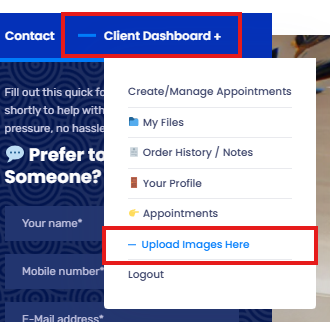
You’ll be prompted to upload your photo during checkout or through your Client Dashboard.
Look for the section titled “Upload Images Here” and drag your photo directly into the upload box.
If you’re on a phone, you can upload directly from your camera roll or files app.
📘 Step 3: Add Notes or Instructions
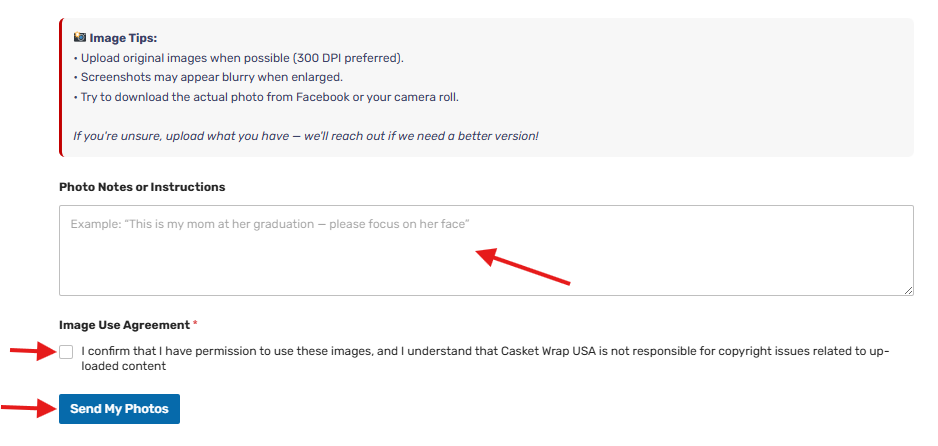
Right under the image upload area, you’ll see a comment box where you can add details like:
- Name of your loved one (If memorial design)
- Dates to include (if applicable)
- Any themes or colors you prefer
- “Please focus on their face” or “This photo is from their graduation”
The more context you share, the better we can personalize your tribute.
✉️ Need Help? We’re Here
If you’re unsure which photo to choose, feel free to upload multiple. We’ll reach out and help you pick the strongest one for print.
You can also email us directly at office@divinekrystal.com or call 1-866-957-7759.
✨ Final Tip: Don’t Overthink It
Remember: the goal is to celebrate their life, not create perfection.
Even an old photo with love in their eyes can become a beautiful tribute.
We’re honored to help you every step of the way.
Why We Use the Client Dashboard
The dashboard helps us:
*Keep your files linked directly to your order
*Prevent lost email attachments
*Track revisions
*Stay organized for faster turnaround
It protects your project from delays.
Need to Check Your Order?
Inside your Client Dashboard you can also:
*View Order History / Notes
*Check Your Profile
*Access My Files
Everything is centralized for your convenience.
Final Tip
If you ever upload the wrong image by accident — don’t panic.
Simply upload the corrected file and leave a note.
We’ll always confirm before production begins.
Thank you for helping us keep your project organized and running smoothly.
We appreciate you trusting us with your vision. 💛